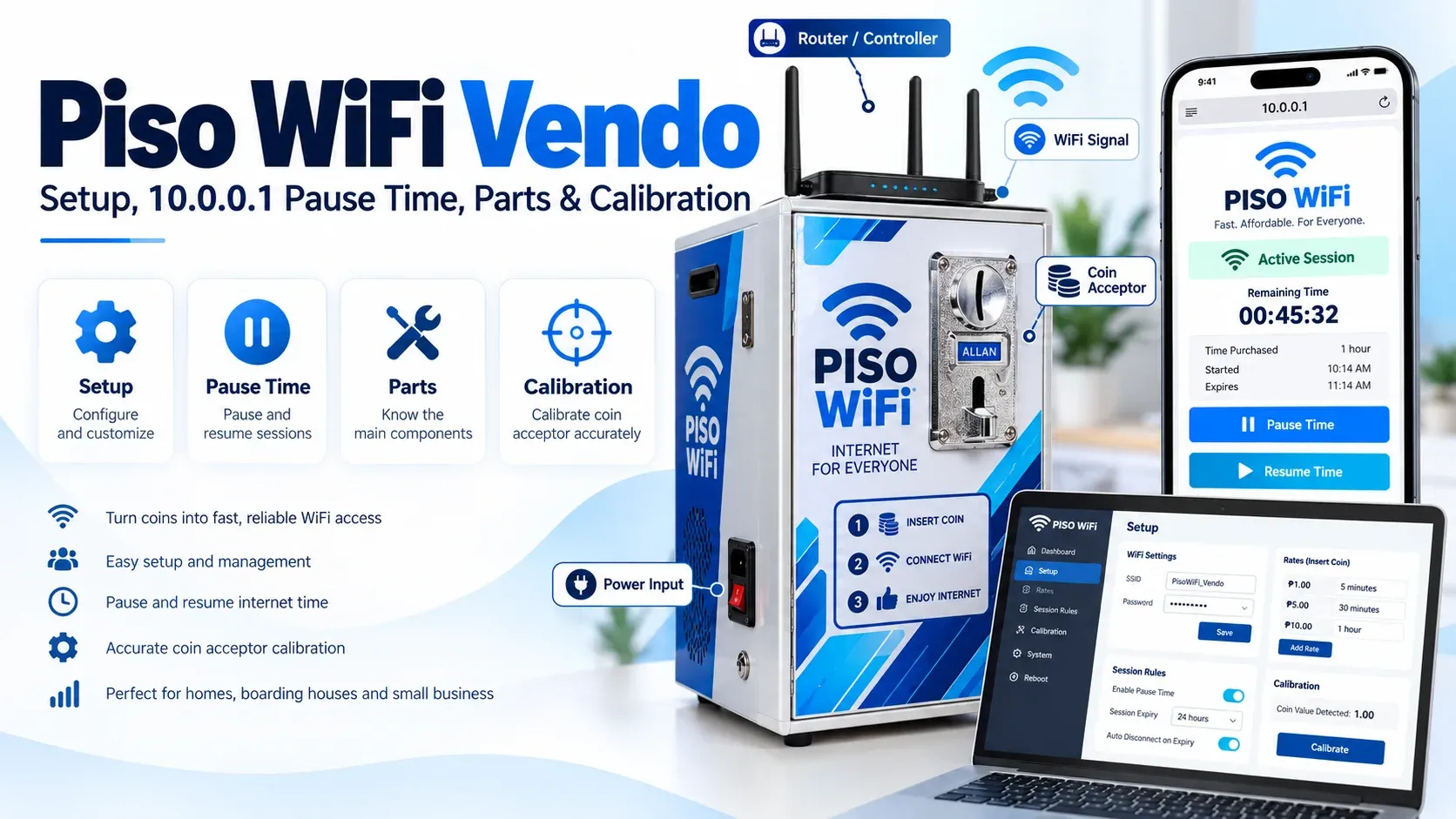
Many stores, waiting rooms and shared spaces only require Internet access for the occasional message, schoolwork, browsing, and other routine activities. Having to pay for a full internet plan may seem like a waste if you're just using WiFi for a short period of time. A Piso WiFi Vendo solves this issue by enabling you to pay for the internet time you require.
The service is generally straightforward but can sometimes be confusing. The portal might not open, minutes might be charged even though you're not there, or the machine may refuse a payment. We'll discuss 10.0.0.1 access, Vendo Piso WiFi Pause Time, machine setup, coin calibration and common connection and payment issues.
What are Piso WiFi Vendos?
A Piso WiFi Vendo is an internet access system that offers internet access for a limited time. You join the WiFi network and pay with a means of payment that is available. The system then provides you with internet time according to the operator's internet rate. Internet until the paid time is up.
The term “vendo” has been inspired by the concept of a vending machine. The system takes care of payment and session time instead of having to ask a person to turn on the internet. The exact features may vary, as owners can employ different software and hardware. Vouchers or electronic payment is also available on some machines.
How Does Piso WiFi Vendo Work?
The paid WiFi system is simple to provide Internet access and to control paid time. The system works as follows:
- 1Tap on the available network to connect your phone, tablet or laptop.
- 2Visit the customer portal and select the payment method that is supported by that machine.
- 3Once the payment is accepted, the system will add internet time to your session.
- 4Session-management software regulates your browsing time and records the time you have left.
- 5There are also Pause and Resume controls to aid in managing your session.
- 6All the rates, session rules, vouchers, etc. can be set by the machine owner in the admin area.

Who can use the Piso WiFi Vendo Machines?
For those who require low-cost internet for a limited period of time. It is possible to pay for a session rather than a monthly connection. Owners of the machines can also provide paid WiFi, with automatic payments and time controls. Common locations include:
Main Piso WiFi Vendo Parts
Several parts are required for this machine to accept payments and give internet access. These are the components of the machine:
Vendo Box or Enclosure
The main hardware is contained and safeguarded by the enclosure. It has a coin acceptor, controller, power components, and indicator lights. These parts are also protected from the normal use of the day by a strong box.
Router or Controller
The router or controller is used to control the network and its customer sessions. Some DIY systems are based on a small computer board and Piso WiFi software. Other machines are already equipped with a controller.
Coin Acceptor
The coin acceptor is used to detect coins inserted by customers. Sends a signal to the controller once it recognises a coin that has been accepted. This is essential for correct calibration because the system must be credited the correct amount.
Wireless Access Point
The WiFi signal the customers join is sent out by the access point. The range may vary depending on the equipment, location, walls and other objects in the immediate vicinity. If the signal is not stable, proper placement can help ensure it reaches the customer.
Power Supply
The various components require various levels of power. For instance, a coin acceptor and controller board are not powered by the same voltage. Always follow your particular piece of hardware requirements.
Internet Connection
The machine does not generate an internet connection. It requires a pre-existing internet connection from an ISP, router, or other supported connection. The quality of this connection impacts the customer experience.
Session Management Software
Software manages rates, internet time, customer sessions, and other controls. Some programs such as LPB and Ado Piso WiFi provide these functions. Available options depend on the platform and version you use.
How to Access Piso WiFi Vendo Through 10.0.0.1?
Some Piso WiFi systems use 10.0.0.1 as the local address for the customer portal. Your device normally needs to be connected to the correct vendo network before this local page can open. Another machine uses a different gateway if its setup has been changed.
Here are the basic steps you can follow to open the customer portal:
- 1Connect your phone or laptop to the Piso WiFi network.
- 2Open Chrome, Safari, Edge, or another browser.
- 3Tap the browser address bar at the top.
- 4Enter 10.0.0.1 directly into the address bar.
- 5Press Enter or Go, and wait for the page to open.
- 6Check the available payment and session options.
- 7Start or manage your internet session from the portal.

10.0.0.1 Piso WiFi Vendo Pause Login
The Piso Wifi Login helps you manage your active internet session. If Pause Time is enabled, the customer portal allows you to:
Note: You do not need owner-level admin access to manage your own session. If the Pause option is missing, the machine settings do not support or enable this feature.
How to Use 10.0.0.1 Piso WiFi Vendo Pause?
You should pause the session through the portal rather than only disconnecting from WiFi. However, turning WiFi off does not always tell the system to stop your timer. Follow these steps for 10.0.0.1 Vendo Piso WiFi Pause:
- 1Stay connected to the same Piso WiFi network.
- 2Open your browser on the device you are using.
- 3Enter 10.0.0.1 in the address bar.
- 4Find your active internet session.
- 5Look for the Pause or Pause Time option.
- 6Select Pause and check the session status.
- 7Disconnect after the portal confirms the pause.

How to Resume Piso WiFi Vendo Pause Time?
This feature is useful only when you know how to continue your saved session. Reconnect to the same network when you are ready to browse again. Follow these steps to resume your remaining internet time:
- Open the local portal and look for a Resume or Continue option.
- Select it and check whether your remaining minutes begin counting again.
- If nothing happens, reconnect to WiFi and reload the portal before trying other fixes.
10.0.0.1 Piso WiFi Vendo Pause Time Limits
Pause Time does not work the same way on every machine. The operator decides whether the feature is available and sets rules for customer sessions. This is why another vending machine can behave differently even when both use a similar portal.
You should check the information displayed on the machine you are using. Do not assume your session can remain paused for any length of time. If the rules are unclear, ask the operator before leaving a paid session unused.
10.0.0.1 Piso WiFi Vendo Windows Access
You can open the customer portal from a Windows computer. Access works through a web browser, so you usually do not need a special application. Your computer must first join the correct WiFi network. Here are the steps for a Windows device:
- 1Open the WiFi menu on your Windows computer.
- 2Select the correct Piso WiFi network.
- 3Wait until your computer connects.
- 4Open Chrome, Edge, or another browser.
- 5Type 10.0.0.1 in the address bar.
- 6Wait for the customer portal to appear.
- 7Use the payment, Pause, or Resume option you need.
If the page does not load, check that your computer is still connected to the vendo network.
How to Calibrate Piso WiFi Vendo Machine?
Coin calibration helps the machine identify accepted coins and give customers the correct credit. Proper settings can also prevent valid coins from being rejected. Follow these steps to calibrate the coin acceptor correctly:
1. Check the Power Requirements
First, check the proper voltage of the coin acceptor. Wrong power can result in faulty performance or damage to the equipment.
2. Open the Calibration Mode
There is a button or control on many programmable coin acceptors for setting them into setup mode. It can be different depending on the model. Use the directions given with your acceptor.
3. Add Coin Samples
The acceptor could request that you place a few examples of each type of coin. The samples are used to identify the features of an accepted coin. In the process, use clean and genuine coins.
4. Set the Correct Pulse Value
The coin acceptor sends pulses to the controller when a valid coin is inserted. These pulses must be identical to the value that you expect to get from your Piso WiFi system.
5. Check the Sensitivity
Some coin acceptors can be set to recognize the coins at various levels of sensitivity. If the setting is too loose, it can accept unwanted items, and if it is too strict, it can reject valid coins. Test the machine carefully, making small changes.
6. Test Every Accepted Coin
Finish by testing each denomination that you plan to accept. Verify that the machine can detect the coin and add the proper Internet time. If the credit doesn't match your rates, repeat the setup.

How to Set Up a Piso WiFi Vendo Machine?
A Piso WiFi needs proper internet, payment, software, rates, and WiFi settings. Follow these steps to set it up:
- 1Set up a secure internet connection.
- 2Put away or set up the vendo equipment.
- 3Install or set up necessary software.
- 4Properly connect the payment hardware.
- 5Determine your rates and available time packages.
- 6If using coins, adjust the coin acceptor.
- 7Connect a test device to the WiFi network. Connect a test device to the WiFi network.
- 8Do a test payment and verify the extra time.
- 9If these features are enabled, test Pause and Resume.
- 10Ensure the machine is located in a place where customers can get a strong signal.

How to Make Piso WiFi Without Vendo Machine?
A physical coin box is not required for every type of paid WiFi setup. If you want to know how to make Piso WiFi without vendo machine, one option is to use a voucher-based system. Customers receive Piso Wifi voucher codes that provide a set amount of internet time. A general voucher-based setup can work like this:
- 1Connect a supported access point to your internet source.
- 2Configure the customer network and session system.
- 3Create voucher codes with selected time limits.
- 4Provide the correct voucher after receiving payment.
- 5Let the customer enter the code through the portal.
- 6Check that the correct amount of time is activated.
Important Note: This setup can reduce the need to manage a physical coin acceptor. However, you still need to manage payments, voucher codes, WiFi coverage, and customer access properly.
How To Choose the Best Piso WiFi Vendo Machine?
You should compare machines based on practical features instead of relying only on the seller's claims. Consider these factors before making your choice:
- Ready-made or DIY: A ready-made machine can reduce setup work, while DIY gives you more control.
- Payment System: Decide whether you need coins, vouchers, digital payments, or a combination.
- Software: Check whether the platform provides the session controls you need.
- WiFi Coverage: You should choose hardware that can cover your intended customer area.
- Replacement Parts: Make sure important parts can be replaced when needed.
- Seller Support: Clear setup and troubleshooting support can save you time later.
- Internet Capacity: Your internet plan should be able to handle your expected users.
Piso WiFi Vendo Logo and Customer Instructions
A logo can help customers recognize your service, but clear instructions are even more important. Your machine should show the network name and basic connection process. You can also display available rates where customers can easily see them.
Simple signs can reduce confusion for new users. You can include instructions for connecting to WiFi, opening the portal, paying, and using Pause Time. Avoid placing admin passwords or other private management information on public signs.
Ways to Pay for Piso WiFi Vendo
You can use different payment methods depending on the machine setup. Common options include:
- Coins _ Insert coins to receive internet time.
- Cash Bills _ Some machines can accept paper bills.
- E-Wallets _ Pay through a supported digital wallet.
- QR Payment _ Scan the QR code and complete your payment.
- Voucher Code _ Enter a valid code to activate your session.
Common Piso WiFi Vendo Problems and Solutions
You may face a few issues while using or managing a Vendo iso machine. Here are some common problems and solutions you can try to fix them.
10.0.0.1 Does Not Open
Confirm that your device is connected to the correct Piso WiFi network. Turn off mobile data temporarily and enter 10.0.0.1 directly in the browser address bar. If the machine uses another gateway, follow the address provided by its operator.
Pause Time Is Missing
The owner may not have enabled the Vendo Pause Time feature. Customers usually cannot activate an owner-controlled feature from their own portal. Ask the operator if the Pause button does not appear.
Coins Are Being Rejected
Check the coin acceptor and its calibration. Dirt, incorrect settings, power problems, or poor calibration can affect coin recognition. Test several genuine coins before changing the hardware.
Wrong Time Is Added
The pulse value or rate setting can not match the coin inserted. Verify the coin acceptor settings and pricing. Perform another test transaction following authorised changes.
WiFi Network Is Not Showing
Get near the access point and update your list of WiFi networks. If multiple customers are unable to see the network, the machine might require additional inspection. The access point, power, or network configuration could be involved.
Your Session Keeps Disconnecting
Log in to the WiFi and re-enter the customer portal. The owner of the machine should check the router and internet connection if the problem occurs on multiple machines. If your phone is not the cause of a repeated issue, you need to troubleshoot the problem.
Where to Install a Piso WiFi Vendo?
The right location can help you reach more customers and avoid poor connections. Always choose a place where people often need affordable WiFi and can easily access your machine. Some suitable locations include:
- Neighbourhood Stores: Small stores can provide short-term Internet access to nearby customers.
- WiFi in Waiting Areas: WiFi can be used at terminals, clinics or other high-traffic areas.
- Near Schools: Students can require access to affordable Internet for browsing, studying and other Internet-related activities.
- Markets: Many users can visit the markets during the day.
- Commercial Areas: Paid WiFi may be in demand in shops and business areas.
- Shared Boarding: Boarding houses and shared living areas may also be appropriate.
Safety Tips for Piso WiFi Vendo Users and Owners
Shared WiFi should be used with care, especially when you are entering personal information online. Here are some basic safety tips:
- Do not share the admin password.
- Change default owner credentials as appropriate.
- Never give other people personal session information.
- Don't do any sensitive financial activity on networks you don't trust.
- Log off of important accounts after using shared devices.
- Keep machine software and settings properly maintained.
- Do not change admin controls unless you understand their purpose.
Frequently Asked Questions
How much does a Piso WiFi Vendo machine cost?
The price depends on the machine type, hardware, payment system, and included features. Ready-made units cost more than DIY setups because many parts are already installed.
Can Piso WiFi Work without Coins?
Yes, some setups use voucher codes or supported digital payment methods instead of coins. The available payment options depend on how the machine is configured.
How many users can connect to a Piso WiFi machine?
The number of users depends on the router, internet speed, WiFi coverage, and network settings. Too many connected devices can make the connection slower.
Does Piso WiFi need an Internet connection?
Yes, the machine cannot generate Internet service by itself. It requires an active Internet source from an ISP, router, or other supported connection to offer WiFi service.
Can I make Piso WiFi without a vendo machine?
Yes, there are setups that don't have a physical box, but rather use vouchers. Internet connectivity, proper network equipment and a system for managing customer sessions are still required.
What is the meaning of Piso WiFi Vendo 2?
It is a new model, new software or a second machine. It has several meanings depending on the seller, so be sure to read the product information before selecting it.
Conclusion
A Piso WiFi Vendo is one of the best solutions to enjoy free internet access without having to sign up for a monthly plan. Use Pause Time to connect to the network and pay for your session. When using a machine, setting it up correctly, calibrating the coins and securing the admin settings can help it run smoothly.